
LabFlow LIMS
LabFlow LIMS — Offline Lab Management for Personal Labs
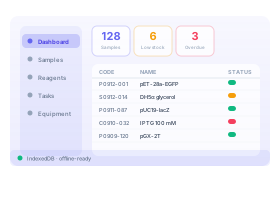
A free, offline lab information management system built for personal labs and small research groups. It runs in your browser: register samples with auto-generated codes, track reagent stock and expiry, manage experiment tasks and equipment maintenance, record results against your own test methods, run QC checks, and issue reports. No install, no sign-up — your data stays on your own computer.
Key features
Sample management with auto-generated codes and status workflows
Reagent inventory with stock in/out history, low-stock & expiry alerts
Experiment tasks linked to samples and reagents, with priorities and due dates
Test methods, QC checks and COA reports, fully offline PWA
How it works
From opening LabFlow LIMS to getting results in three steps.
- 1
Register your inventory
Add samples, reagents, and equipment with auto-generated codes. Record freezer, box, and position, then set low-stock thresholds and expiry dates so nothing slips through.
- 2
Record experiments and test data
Create experiment tasks linked to the samples and reagents you used. When you need documented data, start a test request from a method, enter the results, and let QC rules evaluate them automatically.
- 3
See the whole lab and issue reports
The dashboard gathers low stock, expiring reagents, and overdue tasks; export a report as Markdown or CSV, or print it to PDF on A4 — issuing a report freezes it and keeps a full audit trail.
Who is it for?
Three typical ways people put LabFlow LIMS to work.
Lab managers
Track samples, reagent stock levels, and equipment status in one place — no spreadsheets, no shared drives.
Research groups
Link tasks to samples and reagents, record every status change, and rebuild exactly what happened weeks later.
Personal lab owners
A private lab notebook for your own bench: register plasmids and strains, watch reagent expiry, and never lose track of a sample box — all on your own computer, exportable anytime.
Everything you can do
Sample management
Auto-coded samples (plasmids, strains, proteins, cells and more) with freezer/box/position storage, status workflows, and a full event timeline.
Reagent inventory
Stock in/out with movement history, low-stock alerts, and expiry tracking — batch numbers, vendors, and catalog numbers included.
Experiment tasks & equipment
Priorities, due dates, and assignees linked to the samples and reagents used; register instruments with usage, maintenance, and calibration records plus next-due reminders.
Test methods & QC criteria
Keep test methods as their own library: set specification limits (upper/lower/target), which QC types are required, and every evaluation threshold — configure once and reuse.
Test results, QC verdicts & COA reports
Enter result rows against a method; the engine computes deviation, recovery, and RSD for blanks, controls, duplicates, and spikes, then issues the verdict. Reports export or print to PDF.
Offline, private & backed up
Installs as a PWA and works fully offline with data kept in your browser's local IndexedDB — no account, no server, and a complete JSON backup whenever you want.
Why a browser-based tool?
How LabFlow LIMS compares with desktop software and registration-based online platforms.
| Aspect | LabFlow LIMS | Desktop software | Online platforms |
|---|---|---|---|
| Cost | Free forever | Paid license | Subscription |
| Installation | None — runs in the browser | Download & install | None — runs in the browser |
| Account | No account required | License activation | Registration required |
| Data privacy | Stays on your device | Stored locally | Uploaded to cloud servers |
| Platform | Any device with a browser | Tied to one OS | Any device with a browser |
| Updates | Always up to date | Manual updates | Always up to date |
Frequently asked questions
- Where is my data stored?
- Everything stays on your device. LabFlow LIMS runs entirely in your browser using local IndexedDB storage — no account, no server, and nothing leaves your computer. You can export a full JSON backup at any time.
- Does it work offline?
- Yes. After the first visit you can install it as a PWA and use every feature offline — registering samples, moving stock, editing tasks, and entering test results all work without a network connection.
- What can I track with it?
- Samples (plasmids, strains, proteins, chemicals, cells, oligos), reagents and consumables with stock movements, experiment tasks linked to them, equipment with usage/maintenance/calibration records, and the full test chain: methods, test requests, results with QC verdicts, and issued reports.
- Can I back up or move my data?
- Yes. The settings page exports your entire database to a single JSON file and restores it on any device or browser — ideal for migrating between computers or keeping scheduled backups.
- Is an online multi-user version coming?
- Yes, a cloud-based online LIMS with multi-user collaboration is planned. This offline version is built on the same data model, so your records will be portable when it arrives.
- Is it a good fit for a personal lab?
- Very much so — LabFlow LIMS is designed for personal labs, individual researchers, and small teams: free, no sign-up, no server to run, and a single ordinary computer comfortably handles thousands of samples, reagents, tests, and tasks with instant local search and filtering.
Ready to explore LabFlow LIMS?
Launch LabFlow LIMS right now in your browser — free, no sign-up required. Your data stays on your device.