GeneFlow
GeneFlow — Modern Plasmid Editor
A full-featured, browser-based plasmid editor for molecular cloning. Import GenBank/FASTA files, visualize circular and linear maps, run restriction analysis, design cloning workflows, and chat with a built-in AI assistant — all without leaving your browser.
Key features
Circular & linear plasmid maps with zoom, rotate, and minimap
Restriction enzyme analysis with 200+ common enzymes
Gel electrophoresis simulation of digestion fragments
AI assistant for sequence Q&A and cloning design
How it works
From opening GeneFlow to getting results in three steps.
- 1
Import your sequence
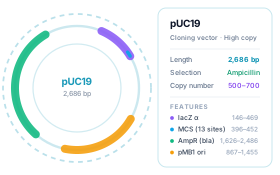
Load GenBank, FASTA, or raw DNA files — or start instantly from built-in example plasmids such as pUC19.
- 2
Visualize & edit
Browse circular and linear maps, add features and primers, run restriction analysis, and design cloning workflows with full undo history.
- 3
Export & share
Export annotated GenBank files or high-resolution map images for lab notebooks, presentations, and publications.
Who is it for?
Three typical ways people put GeneFlow to work.
Cloning researchers
Plan restriction cloning and assembly, verify construct maps, and simulate digests and gels before touching the bench.
Biotech educators
Show students how plasmid maps, features, and enzyme sites fit together with interactive visuals instead of static slides.
Students & trainees
Learn plasmid anatomy hands-on: load an example, translate ORFs, design primers, and experiment freely — mistakes cost nothing.
Everything you can do
Circular & linear map views
Zoom, rotate, and navigate with a minimap; features and enzyme sites render in clear, layered lanes.
Restriction enzyme analysis
Browse 200+ common enzymes, find single cutters, and simulate double digests with fragment size tables.
Gel electrophoresis simulation
Preview expected digestion bands on a virtual agarose gel before running the real one.
Cloning workflow designer
Plan restriction cloning, Gibson assembly, and TOPO/TA cloning with automatic construct previews.
Primer design & PCR simulation
Design primers with Tm calculation and simulate PCR amplification fully in silico.
AI assistant
Ask questions about your sequence, request edits, or let the agent run multi-step cloning tasks through conversation.
Why a browser-based tool?
How GeneFlow compares with desktop software and registration-based online platforms.
| Aspect | GeneFlow | Desktop software | Online platforms |
|---|---|---|---|
| Cost | Free forever | Paid license | Subscription |
| Installation | None — runs in the browser | Download & install | None — runs in the browser |
| Account | No account required | License activation | Registration required |
| Data privacy | Stays on your device | Stored locally | Uploaded to cloud servers |
| Platform | Any device with a browser | Tied to one OS | Any device with a browser |
| Updates | Always up to date | Manual updates | Always up to date |
Frequently asked questions
- Is GeneFlow really free to use?
- Yes. GeneFlow is completely free and runs entirely in your browser — no install, no sign-up, and no account required. Your plasmid data stays on your device.
- What file formats can GeneFlow import?
- GeneFlow imports GenBank and FASTA files plus raw DNA sequences. You can also build a plasmid from scratch or load one of the built-in example plasmids to get started.
- Is my sequence data uploaded anywhere?
- No. Sequence analysis runs locally in your browser. Your files are processed on your device and never uploaded to a server — you can even keep working after going offline.
- Can I use GeneFlow on a tablet or Chromebook?
- Yes. GeneFlow runs in any modern browser, including tablets and Chromebooks — handy for classroom use and quick checks at the bench.
- How is GeneFlow different from SnapGene or Benchling?
- GeneFlow covers the core cloning workflow — maps, restriction analysis, gel simulation, cloning design, and primer design — for free, with no account, and with data that stays local. Desktop suites add enterprise features at a license cost; cloud platforms require registration and store your sequences on their servers.
- Is GeneFlow suitable for teaching?
- Yes. Built-in example plasmids, an intuitive interface, and a step-by-step undo history make it easy to demonstrate cloning concepts live in class — students can follow along on any device.
Ready to explore GeneFlow?
Launch GeneFlow right now in your browser — free, no sign-up required. Your data stays on your device.